Your cTrader trades. Journaled automatically.
The free Sovereign Trader Connector for cTrader is launching soon. Every fill becomes a complete trade in your Sovereign Trader journal, with stops, targets, R-multiple and P&L worked out for you, and an AI coach that reads it all, right in Telegram.
The connector is in cTrader Store review. Set up your Sovereign Trader account now so you're ready the day it goes live. New to Sovereign Trader? €29/month for your first 6 months with code CTRADER29 at checkout, then €39/month. (Introductory launch offer.)
Launching soon
The Sovereign Trader Connector is currently in cTrader Store review and will be installable shortly. In the meantime you can set up your Sovereign Trader account and generate your API key, so you're ready the moment it goes live. New here? Use CTRADER29 at checkout for €29/month for your first 6 months, then €39/month. Introductory offer.
How it works
Install the plugin
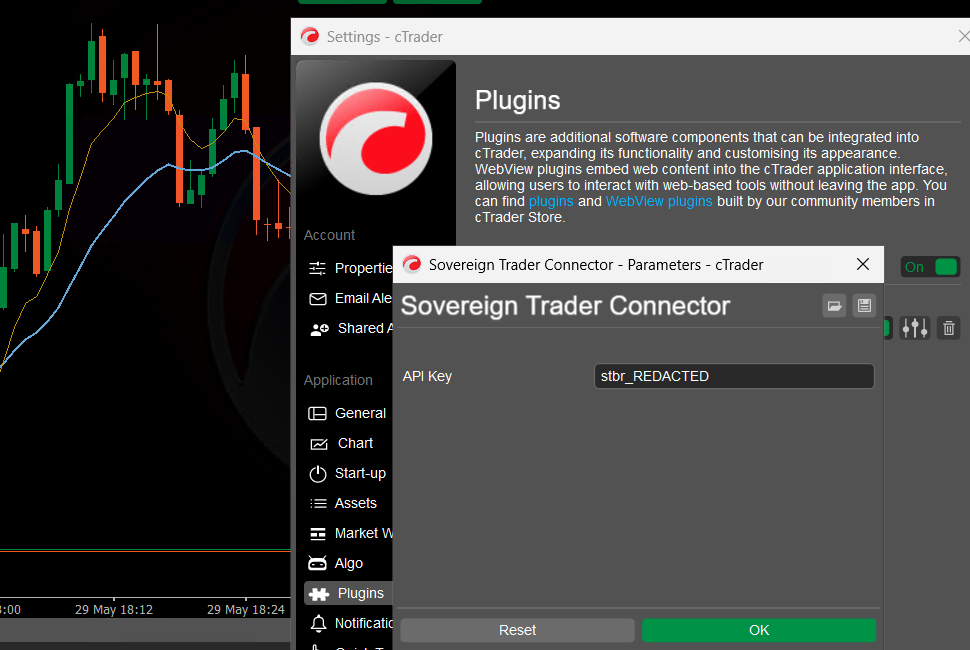
Once it's live, you'll install Sovereign Trader Connector from the cTrader Store. It appears under Settings → Plugins in cTrader.
Enter your API key
Get your API key from your Sovereign Trader dashboard under Settings. Enable the plugin in cTrader, open its Parameters, and paste the key into the single API Key field. That's the entire setup. There's nothing else to configure.
Trade. Your trades log themselves.
When your Trade phase is active in Sovereign Trader, every fill is captured the moment it happens, and grouped into a complete trade, with entry, exit, size and P&L worked out for you. No copy-paste. No interruption.
What you get
A trade journal that builds itself
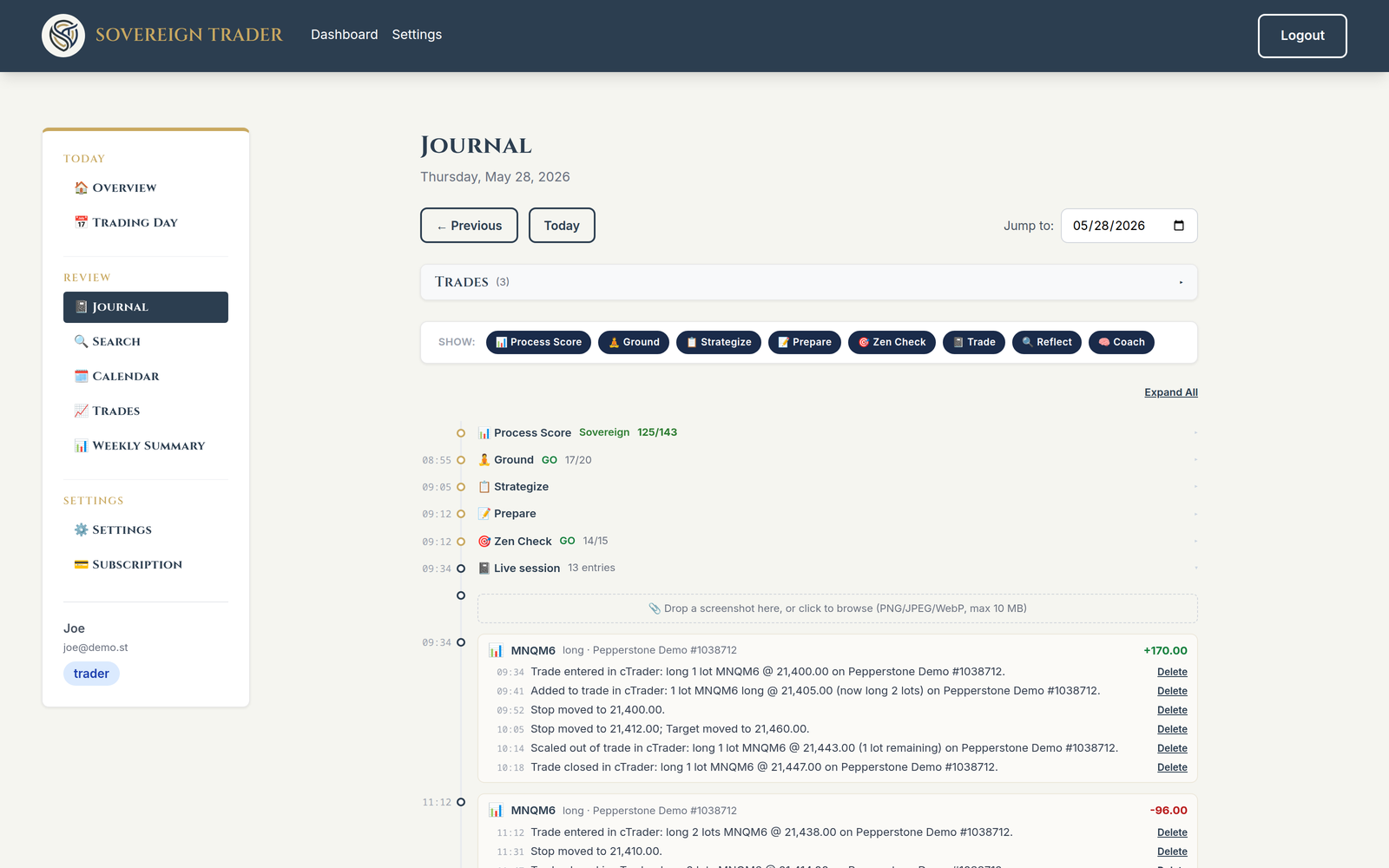
Your fills don't just get logged: the Connector builds a structured trade record. Entries, adds, scale-outs and exits are grouped into one trade, automatically. And you barely type a word. Speak your thoughts as voice notes during the session, and your trades log themselves. You end the day with a richer journal than you'd ever write by hand.
- Worked out for you: average entry and exit, quantity, duration, per trade.
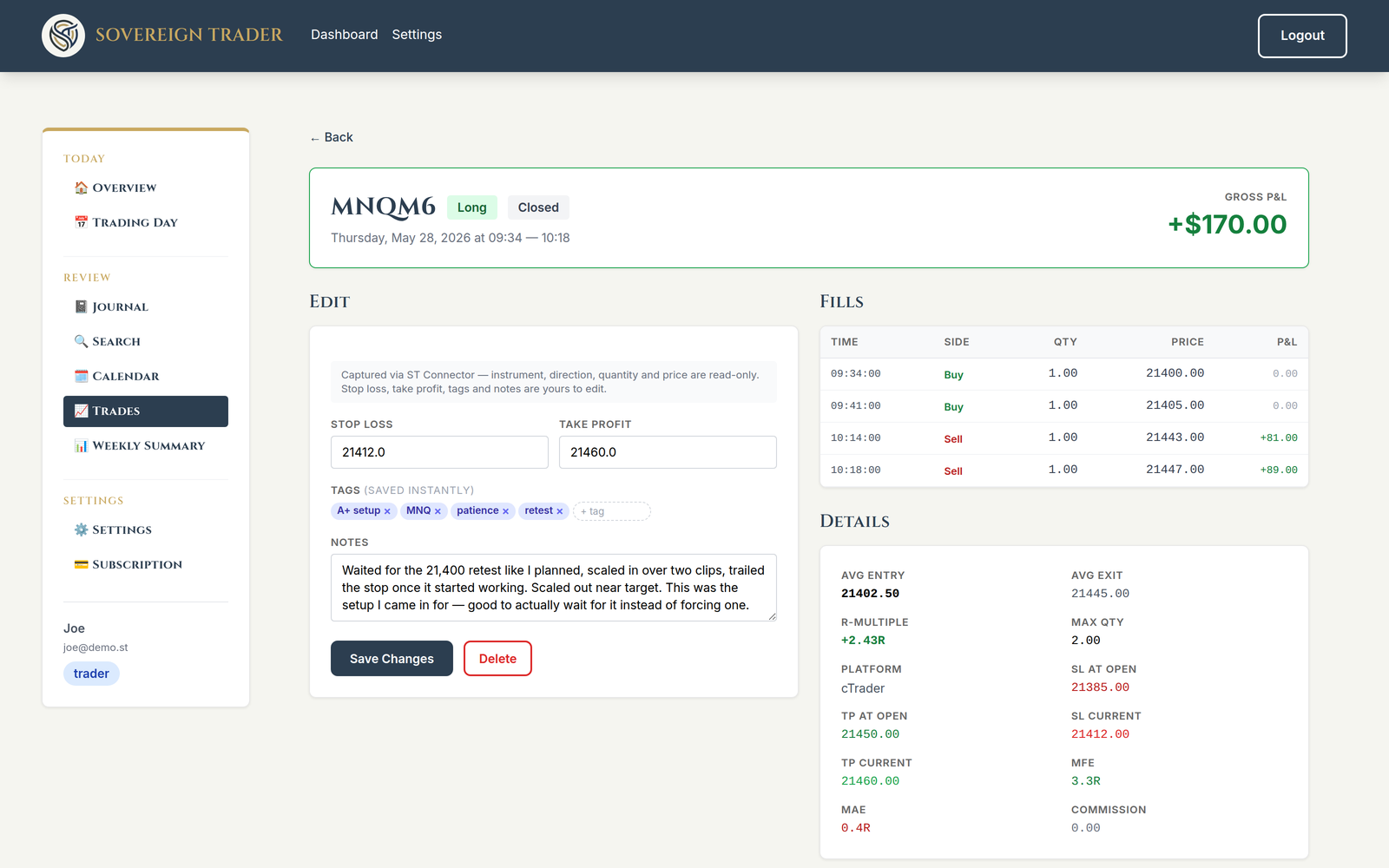
- Stops and targets detected, and tracked as they move. Your SL/TP at entry are recorded; trail or move them mid-trade and that's captured too. The "trailing bit me" pattern, finally visible.
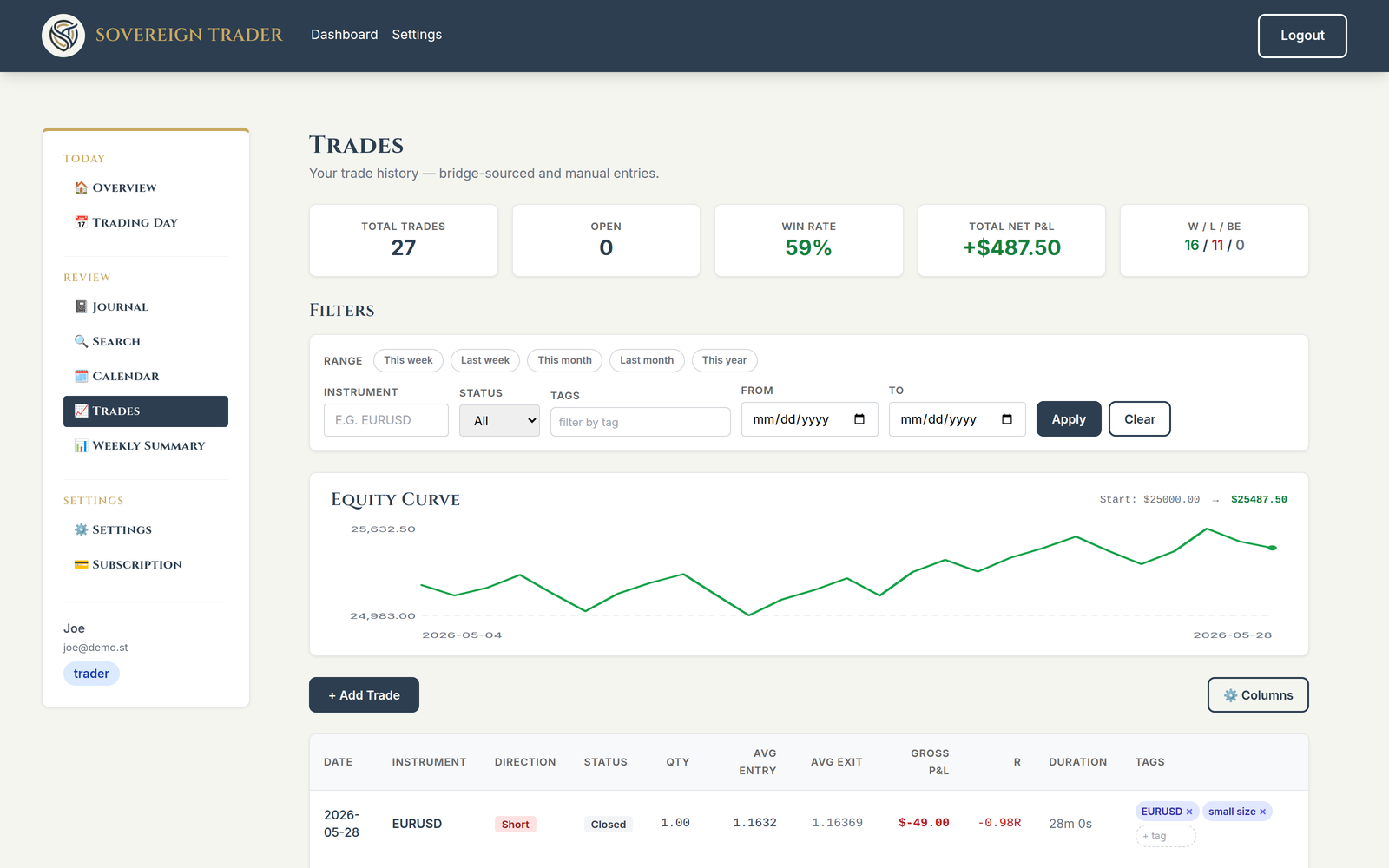
- The numbers that matter, curated: realized P&L, R-multiple, win rate, an equity curve, max favourable/adverse excursion. The essentials, done well. Not a widget farm.
- Yours to annotate: broker data is read-only, but the tags and notes are yours. Mark the setup, flag the rule you broke.
- Manual trades too: traded somewhere the Connector doesn't reach? Add a trade by hand. Your record stays whole.
Works with any cTrader instrument (FX, indices, metals, crypto, shares), and both hedging and netting accounts.
And a coach that works from it
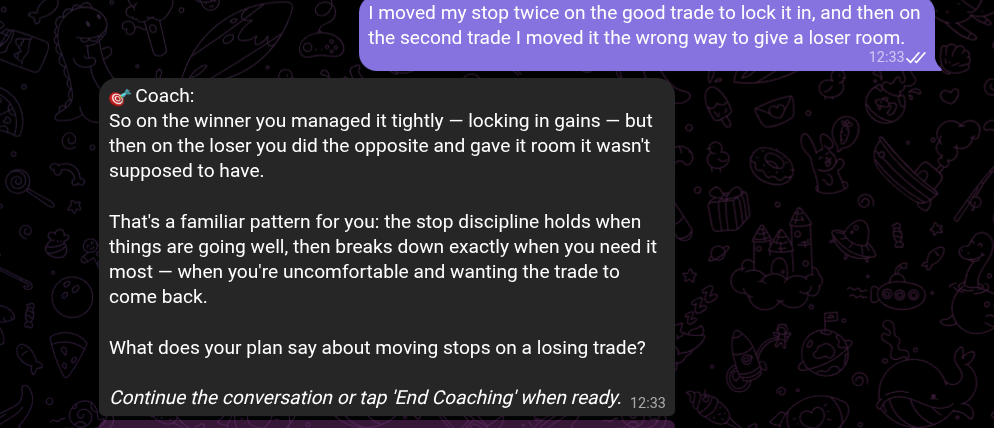
Sovereign Trader is an AI trading companion, a coach you talk to in Telegram, before, during and after the session. Because it reads the same journal, the trade you just took becomes the thing it reflects back to you. Not generic tips. It reflects your own behaviour back: "you moved your stop twice on that one, what were you noticing?"
See your month at a glance
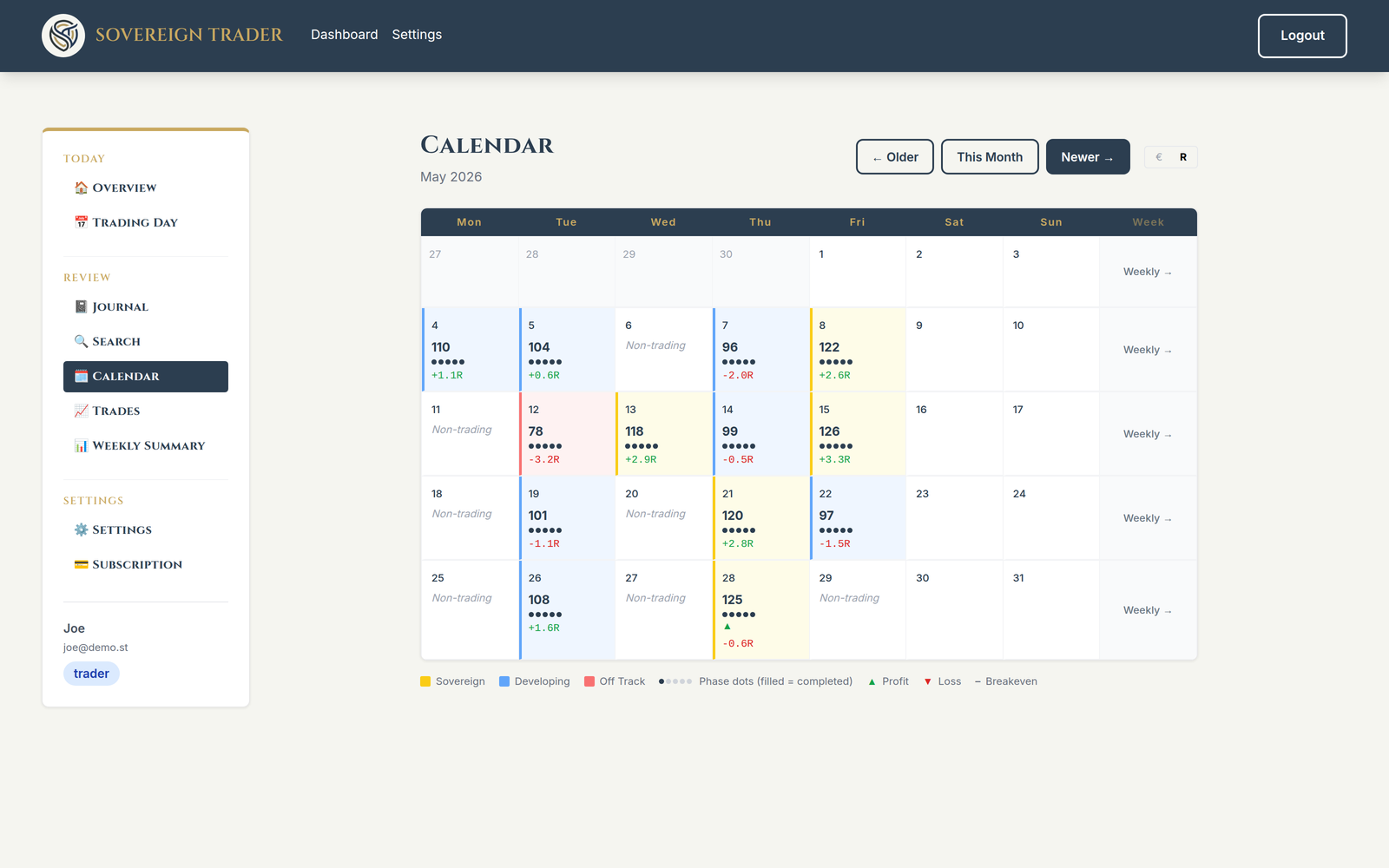
Every day rolls up into a calendar: your process score and your R for the day, colour-coded by how you traded. Patterns across the month surface on their own.
Requirements
- cTrader (any broker account, demo or live)
- A Sovereign Trader subscription: €39/month, or €29/month for your first 6 months with code
CTRADER29at checkout (cTrader launch offer). subscribe → - The free Sovereign Trader Connector plugin (launching soon on the cTrader Store)
Full step-by-step setup guide
Heads-up: the connector is launching soon and is currently in cTrader Store review. This is how setup will work once it's live, so you know what to expect.
Before you start
You need:
- cTrader running with any broker account (demo or live)
- A Sovereign Trader subscription at sovereigntrader.net
- 5 minutes
Install from the cTrader Store
Once the connector is live on the Store, open cTrader → Store → search Sovereign Trader Connector → Install. The plugin appears under Settings → Plugins once installed.
Generate your API key
Log into your Sovereign Trader dashboard → Settings → Sovereign Trader Connector → click Generate API key. Copy the key that appears.
Enable the plugin
In cTrader, open Settings → Plugins and turn on Sovereign Trader Connector.
Paste your API key
Open the plugin's Parameters and paste the key into the single API Key field. That's the only setting. There's nothing else to configure.
| Parameter | Value |
|---|---|
| API Key | Paste the key from Step 2 |
Confirm the connection
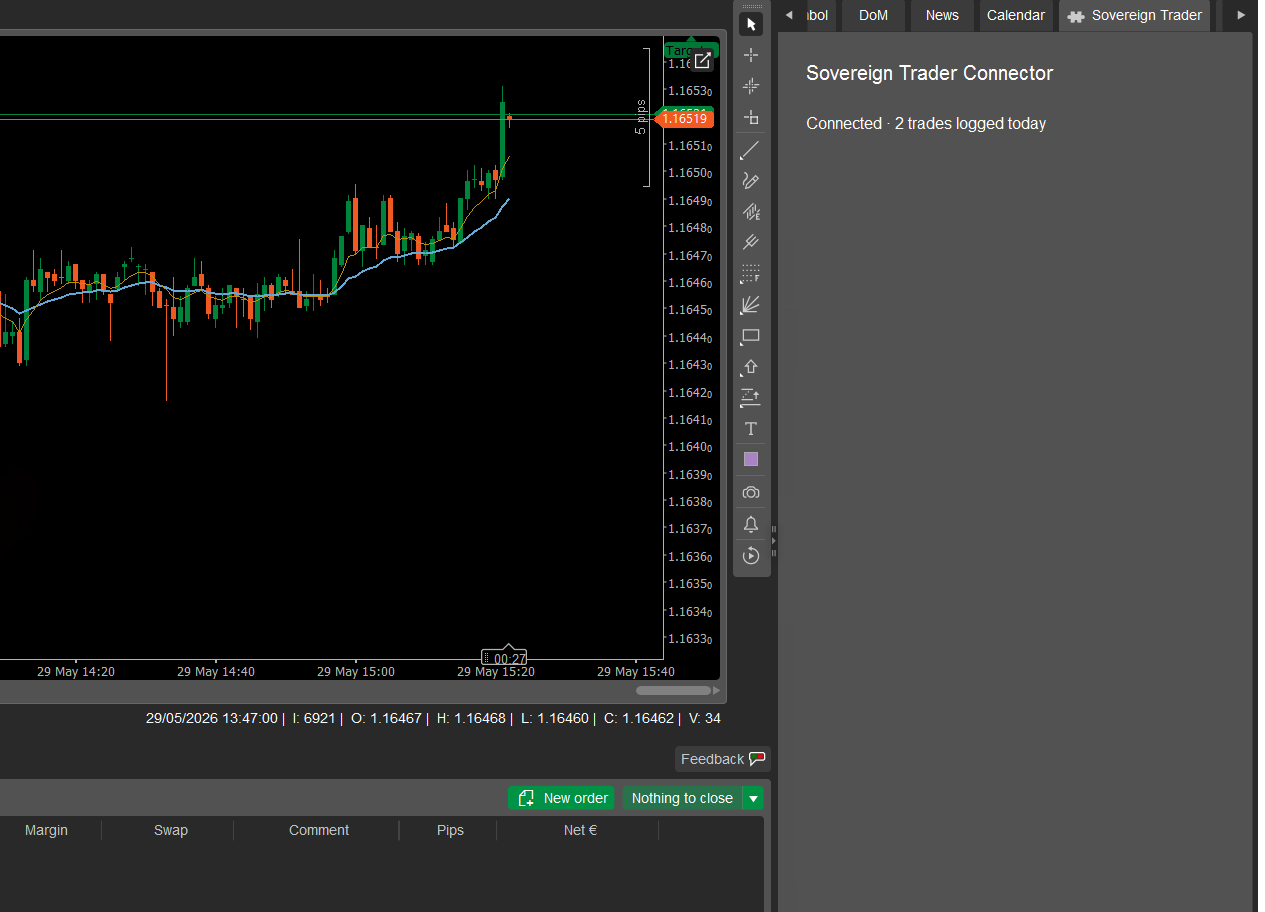
A Sovereign Trader tab appears in the cTrader UI with a live status line. You'll see:
Start the Trade phase before trading
The Connector only logs fills when your Trade phase (Phase 4) is active. Open Sovereign Trader, web or Telegram, and start your session before your first trade. The status tab updates to Connected · N trades logged today once fills are recording.
You're connected
Every fill from your cTrader account will now appear automatically in your Sovereign Trader journal during active Trade sessions.
Troubleshooting
Open the Sovereign Trader tab in cTrader first. It shows a live status line. Common messages:
Fills aren't appearing in my journal
- Confirm the Trade phase (Phase 4) is active in Sovereign Trader when you trade. Fills are only captured during active sessions and are not queued retroactively
- Check the Sovereign Trader tab in cTrader for the messages above
- Confirm your API key matches exactly (no leading/trailing spaces)
I regenerated my API key. Do I need to restart the plugin?
Yes. Open the plugin's Parameters, paste the new key, then disable and re-enable the plugin in Settings → Plugins to apply it.
Frequently asked questions
Does this work with demo accounts?
Yes. The plugin works with any cTrader account, demo or live. Fill events are identical.
Do I need a Sovereign Trader subscription to use the plugin?
Yes. The plugin is free to install, but requires an active Sovereign Trader subscription to function. Without a subscription, fills are rejected. Your API key is tied to your subscription status.
What does the trade journal actually show me?
Each trade is built for you from your fills: average entry and exit, quantity, duration, realized P&L and R-multiple, plus the stop-loss and take-profit that were in force (and how they moved if you trailed them). Across your trades you get the numbers that matter: win rate, an equity curve, max favourable/adverse excursion. Curated essentials, not a widget farm. You can tag and annotate any trade.
Is this a P&L tracker or a trade-analytics tool?
Sovereign Trader is an AI trading coach first. It does keep a real trade journal (auto-captured trades with the stats that matter), but the point isn't the dashboard; it's that your coach works from your actual trading record, before, during and after the session. If post-hoc analytics is all you want, we're probably not your tool.
Can I edit or delete my trades?
Broker-captured data (fills, prices, P&L) is read-only, so your record stays honest. Your tags and notes are fully editable, and you can add or delete manual trades. Connector-captured trades can be removed if you need to.
Does it work without the Connector?
Yes. You can add trades by hand from the Trades page at any time. The Connector just removes the manual step for your cTrader account.
What data is sent from my cTrader account to Sovereign Trader?
For each fill: instrument, direction, quantity (in lots), price, timestamp, the broker's order/deal/position IDs, your account label (broker name + account number), account currency, the stop-loss and take-profit in force (and every change you make to them), realized P&L, commission and swap where your broker reports them, and max favourable/adverse excursion, transmitted over HTTPS to your own Sovereign Trader journal, authenticated with your personal API key. Your account balance is never sent, the plugin requests Internet access only (not permission to place or manage trades), and it never receives your cTrader login or password. Full detail is in the Connector Data row of our privacy policy.
What happens if I trade when the Trade phase is not active?
The fill is silently skipped. Fills are not queued or retroactively added. Start your Trade phase before trading if you want fills captured.
Can I run the plugin on multiple cTrader accounts simultaneously?
Yes. Each instance uses the same API key and sends fills to your single Sovereign Trader journal.
Does the plugin place trades, enforce stops, or interact with my orders?
No. It is strictly read-only. It observes fill events and forwards them. It cannot place, modify, or cancel orders.
How do I disconnect?
Disable the plugin in Settings → Plugins. To revoke access entirely, delete your API key in Sovereign Trader Settings → Sovereign Trader Connector. You can generate a new key at any time.
I regenerated my API key. Do I need to restart the plugin?
Yes. Paste the new key into the plugin's Parameters, then disable and re-enable the plugin in Settings → Plugins to apply it.
Fills aren't arriving in my journal. What should I check?
Open the Sovereign Trader tab in cTrader. It shows a live status line. Common causes:
- The Trade phase (Phase 4) isn't active in Sovereign Trader when you trade. Fills only land during an active session and are not queued
- API key blank, incorrect, or already regenerated (the Sovereign Trader tab will say so)
- Sovereign Trader subscription lapsed (the Sovereign Trader tab will say so)
If you're still stuck: support@sovereigntrader.net
More questions? See the full FAQ.
Get ready to connect your cTrader account
The connector is launching soon on the cTrader Store. Set up your Sovereign Trader account now so you're ready the day it goes live.
Sovereign Trader Connector is a journaling connector. It does not place trades, provide signals, manage positions, or enforce risk rules. Sovereign Trader is not a financial adviser.